






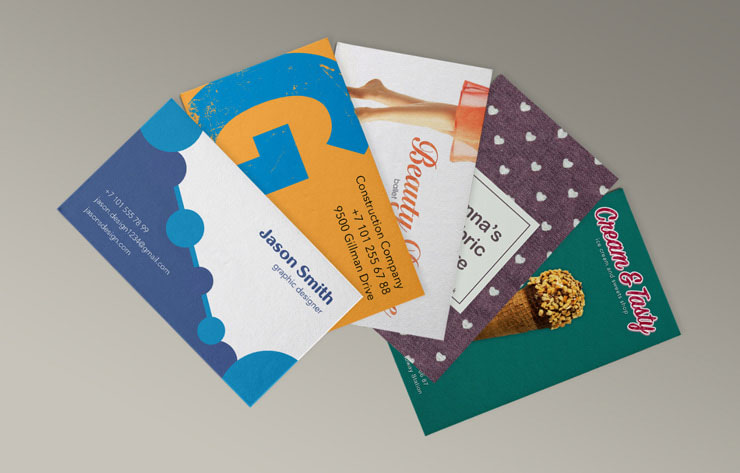





Business cards are like small, tangible advertisements for your business. Even in a world inundated with digital content, custom business cards can help keep your brand top of mind long after a conversation ends. They also add a professional touch to your brand identity, helping you make a strong first impression with customers, clients, and other professionals.
Whether you already have a business card that could use a refresh or you’re creating custom business cards from scratch, choosing the right paper, finish, and design can make a difference. Below are some tips and printing options to help your business cards stay modern and professional in 2026.
Business Card Finishes
The finish you choose for your business card may feel like an afterthought once you have finalized the design, but it can have a significant impact on both the look and feel of the finished product. That’s why it is worth considering your finish early in the design process, rather than leaving it until the end.
In 2026, when increased competition makes standing out essential, businesses may choose business card finishes that help key pieces of information, such as a logo or business name, stand out while delivering a positive first impression. Here are some popular business card finishes you can consider for your business:
Matte Finish Business Cards
Matte business cards have a smooth, non-reflective finish that creates a modern, professional appearance. This finish is often easier to read under bright lighting because it reduces glare and tends to show fewer fingerprints and smudges than glossy finishes, helping your business card maintain a polished look.
Gloss Finish Business Cards
A gloss finish helps keep colours, images, or graphics vibrant and eye-catching on a business card. It also adds a protective coating, making it a practical choice for business cards that will be handled frequently.
Soft-Touch Finish Business Cards
For a more premium look, a soft-touch finish adds a velvety texture that feels smooth and luxurious. It offers a distinctive tactile experience that can set your business card apart from more traditional matte or gloss finishes.
Foil Business Cards
Looking for a finish that instantly catches the eye? Foil business cards use metallic foil to highlight certain design elements, such as your logo or company name, and reflect the light to create an attention-grabbing effect. Finishes are available in gold, silver, and copper.
Metallic Ink on Business Cards
Metallic ink adds a subtle shimmer to printed elements, so that your text, logos, graphics, or accent colours have more visual interest. Unlike foil, metallic inks are printed directly onto the card.
Embossed Business Cards
Want your logo or another design element to stand out? Embossed business cards feature raised details that you’ll be able to see and feel. This textured effect adds depth and creates a memorable, high-quality finish.
Spot UV on Business Cards
Spot UV applies a clear, high-gloss coating to selected areas of your business card while leaving the rest of the surface unchanged, often with a matte finish. For example, applying Spot UV to your logo can create a contrast against the background, drawing attention to one of the most important elements of your design.
Paper Stock Options for Business Cards
The quality of your business card is equally as important as the information printed on it. A well-crafted business card can act as a canvas for key details and can help convey professionalism as soon as someone holds it. In 2026, it’s important to choose business card stock that looks polished and reflects your business’s commitment to detail. Here are some stock options to consider based on your brand identity:
Standard Cardstock for Business Cards
This is a common, durable option with a 14pt thickness. It sits right in the middle of not being too thin or too thick and can often be a cost-effective option.
Premium Cardstock
This is a thicker cardstock, giving off a more premium feel. If you are looking for a more durable business card, this is an excellent option.
Print Three offers multiple quality grades. Click here to get started with your business cards at Print Three.
Business Card Design Tips
Business cards reflect your business, so it’s understandable to want to include as many details as possible. However, in 2026, less is often more. A clean layout and consistent branding can make your business card easier to read and more memorable. Instead of trying to fit every detail onto your card, focus on the key elements. Here are some business card design tips to keep in mind:
Select Single or Double-Sided Business Cards Depending on Your Business
One of the first design decisions you will need to make is whether to print your business cards on one side or both. Single-sided business cards offer a clean, minimalist look and work well if your contact information is concise.
Double-sided business cards give you additional space without making the design feel overcrowded. You might use one side to display your logo with a decorative finish and the other to display important information. If you have more details to share given the nature of your business, using both sides can help maintain a polished, easy-to-read design.
Keep Your Branding Consistent
Your business card should reflect the established branding that you use for all other material, as this can help strengthen brand recognition. Elements to keep consistent can include your:
- Logo
- Brand colours
- Typography (and confirm legibility on your business card)
- Visuals/graphics
Maintain White Space on Your Business Card
White space, also known as negative space, is the empty areas that surround text and other design elements. Adding enough space around the content on your business card will make it easier to read and create a more polished, professional appearance.
Include only the essential information related to your business, such as your name, title, business name, logo, contact details (phone number, email address, website), and any other details recipients will most likely need.
Add NFC to Your Business Card
Adding NFC (Near Field Communication) technology to your business cards with bigDAWGS® is an innovative way to instantly connect recipients to your website, digital portfolio, contact information, or other online material. With a simple tap of a compatible smartphone, the embedded NFC chip directs users to your chosen destination without requiring them to enter a URL manually.
For those looking for an alternative to QR codes, NFC technology offers a seamless, contactless experience. While some people may hesitate to scan a QR code, tapping an NFC-enabled business card can feel more intuitive and adds a modern, interactive touch to a traditional business card.
Print Three is proud to be partnering with bigDAWGS®! Learn more about the technology here: https://youtu.be/3g8aIbeYoDY?si=VTR1m_sWbanLuWte
Use a Professional Printing Partner
After carefully selecting the right design, paper stock, and finish, the final step is choosing a trusted printing partner. At Print Three, we combine quality materials and expert guidance to help you create custom business cards that make a strong first impression. Start the process online or stop by a Print Three location near you to speak with a member of our team.